CATIA V5 Tutorial – How to Use Note Object Attribute with Ditto

How to use Note Object Attribute with Ditto in CATIA V5 FT&A workbench banner image
CATIA V5 Tech

CATIA V5 Tutorial – How to Use Note Object Attribute with Ditto
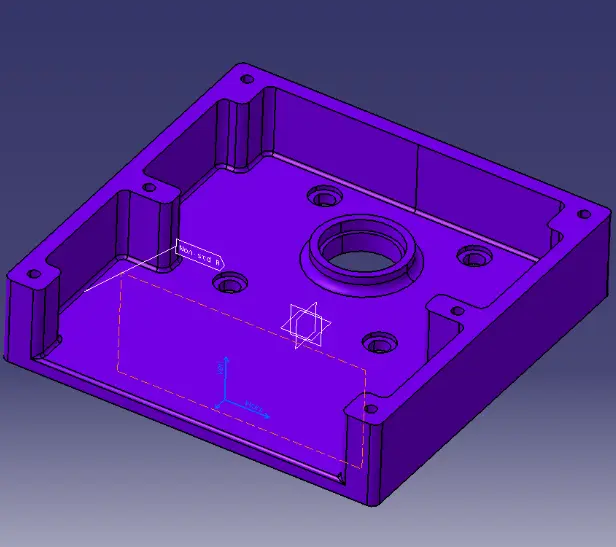
In the FT&A workbench, annotations often need to be repeated with the same structure, symbols, and intent across different areas of a model. Instead of recreating them each time, Note Object Attributes (NOA) combined with Ditto provide a more structured way to reuse annotation elements while maintaining their properties and associativity.

Within this approach, annotations are no longer limited to plain text—they can include graphical components, standardized symbols, and embedded instructions, making them more meaningful in design and manufacturing contexts.

Table of Contents

Before going into the steps, understanding the concept

Note Object Attribute (NOA) is an annotation feature in CATIA that allows the creation of reusable notes with extended capabilities. It supports the inclusion of 2D components, enabling symbols and graphical elements to be embedded directly within annotations.

These elements can also be stored in catalogs and reused across different models, making them suitable for standardized workflows.

Ditto, when used with NOA, enables duplication of these annotations while preserving their structure, properties, and associativity. This ensures consistency without requiring manual recreation.

Creating a Note Object Attribute with Ditto (2D Component):
Step 1:

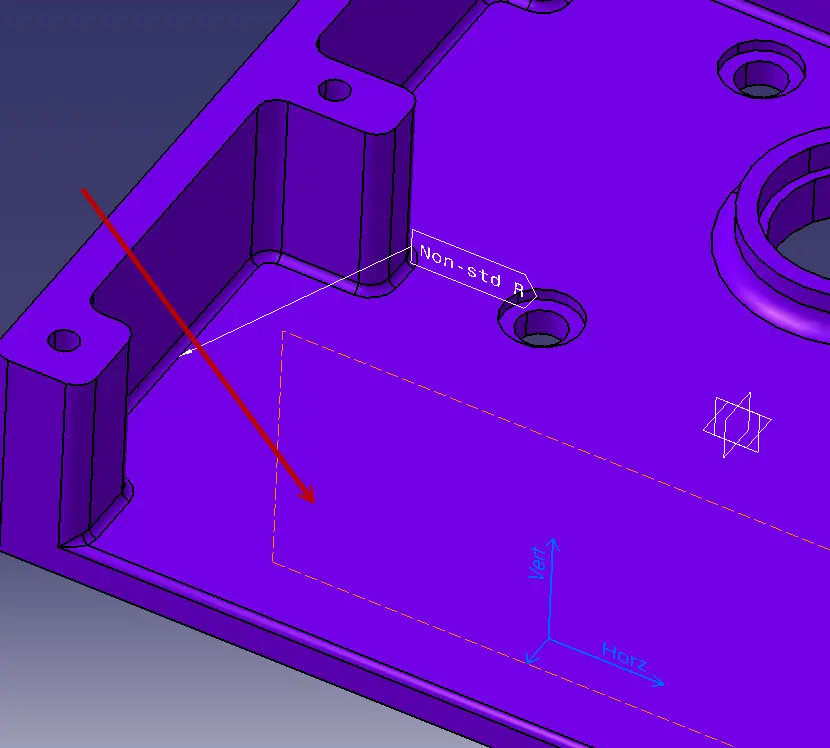
To follow along, open fixture.CATPart and ensure you are in FT&A workbench.

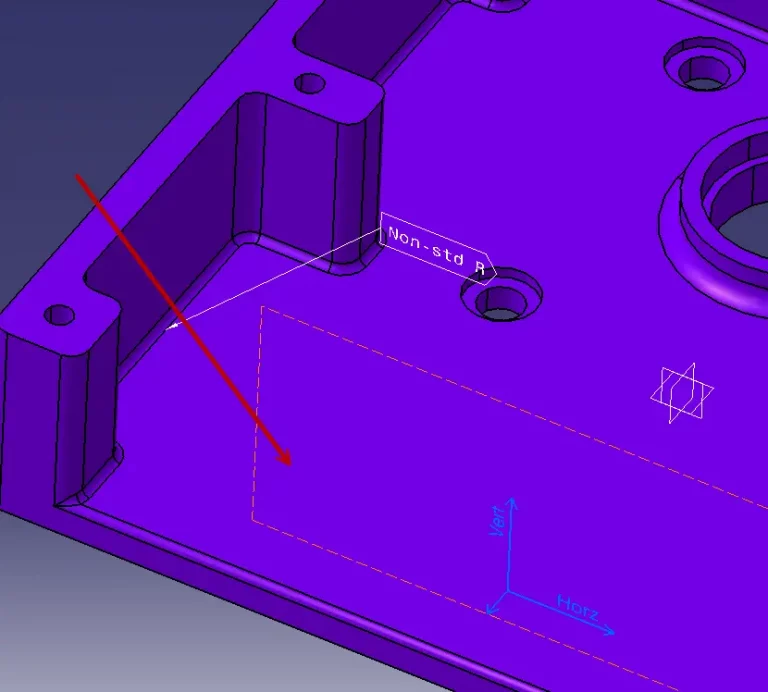
CATIA V5 Note Object Attribute with Ditto example in FT&A workbench showing 3D model annotation
Step 2:

Click Note Object Attribute.

Step 3:

Pick the indicated face.

Selecting a face for Note Object Attribute in CATIA V5 FT&A workbench
Step 4:

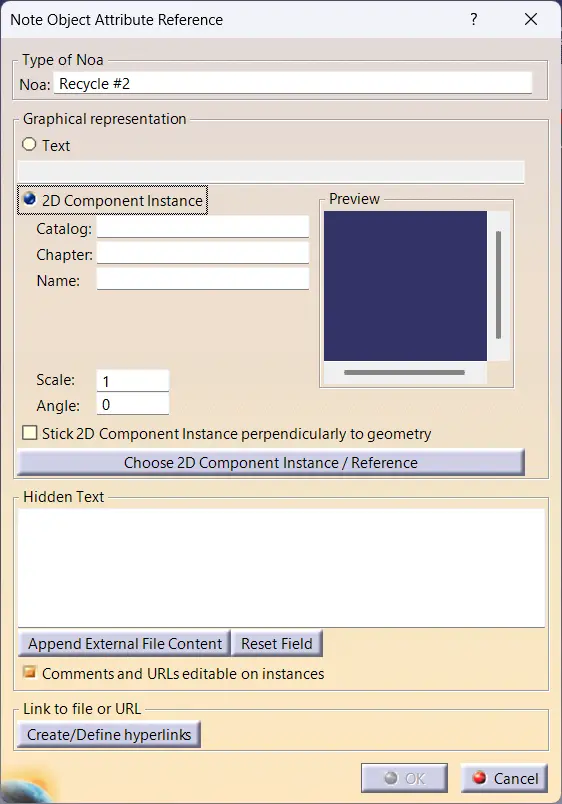
In the Type of Noa area, enter Recycle #2 in the Noa text box.

Entering Note Object Attribute text and settings in CATIA V5 FT&A workbench dialog box
Step 5:

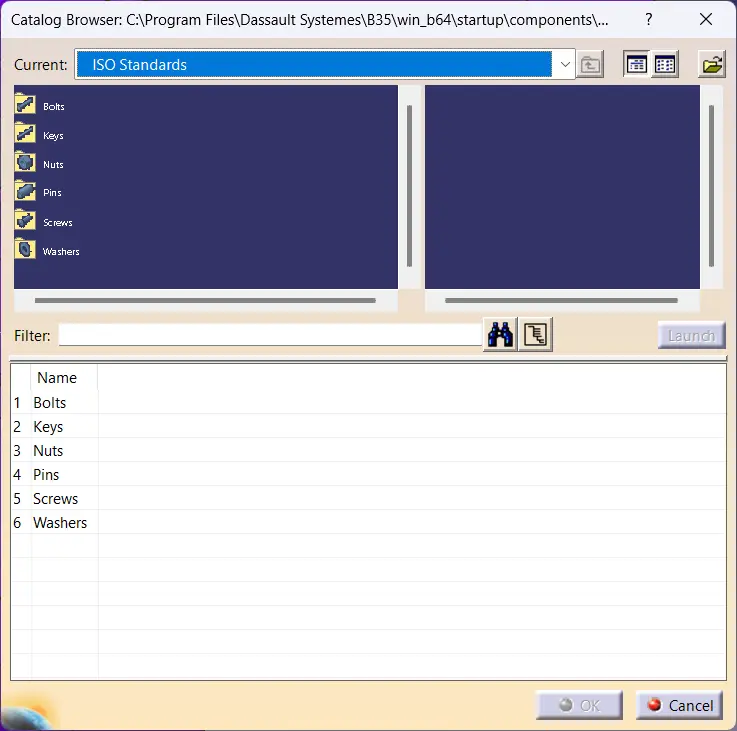
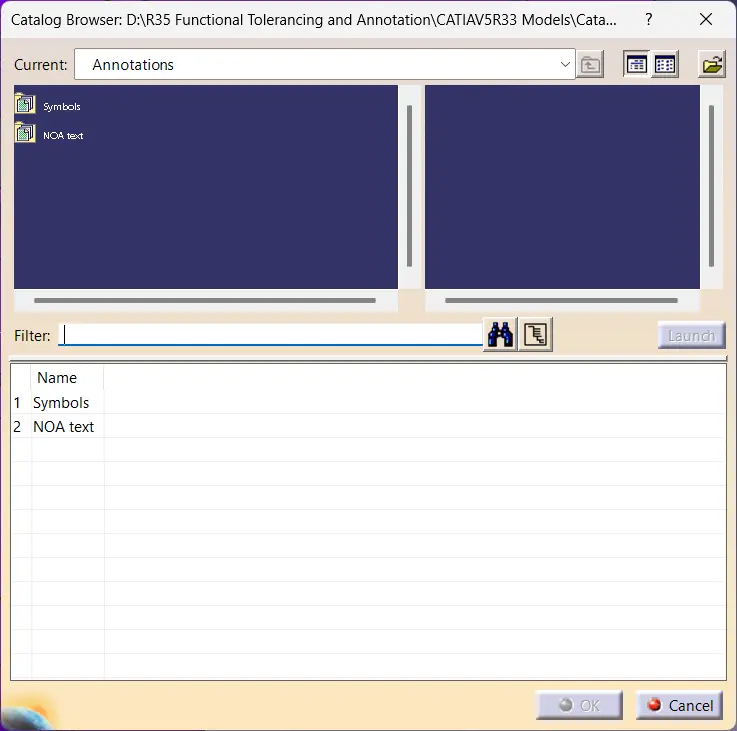
In the Graphical representation area, activate 2D Component Instance and click Choose 2D Component Instance/Reference. The Catalog Browser displays.

Selecting 2D component from catalog browser in CATIA V5 FT&A workbench
Step 6:

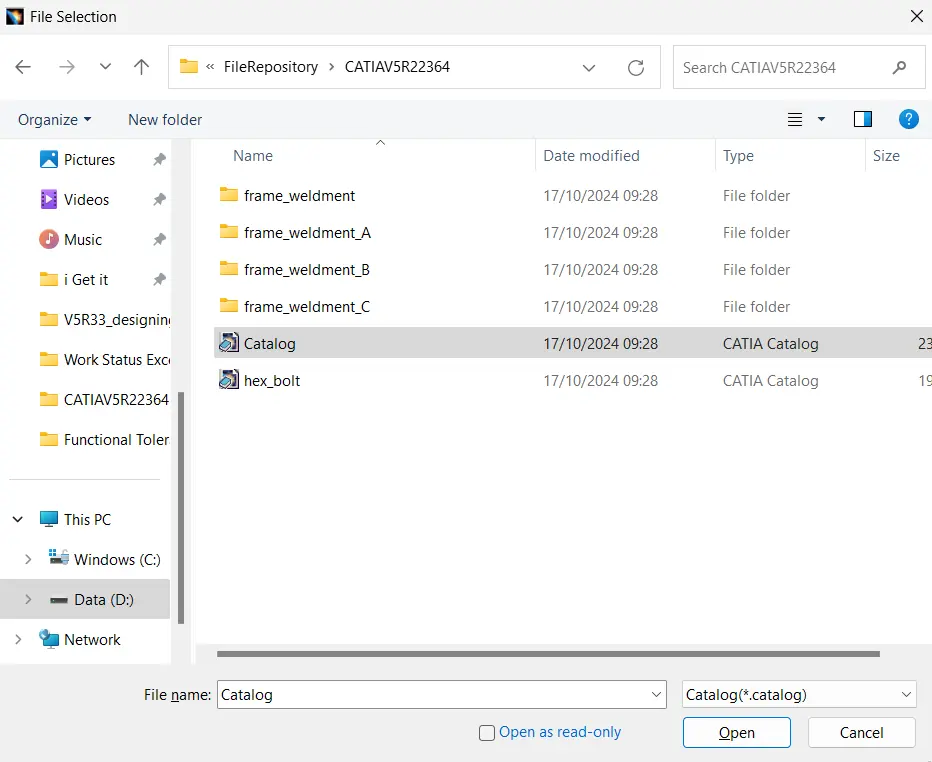
Click Browse in the dialog, browse to the Catalog.catalog, and click Open.

 
Browsing and selecting catalog file in CATIA V5 for Note Object Attribute in FT&A workbench
Step 7:

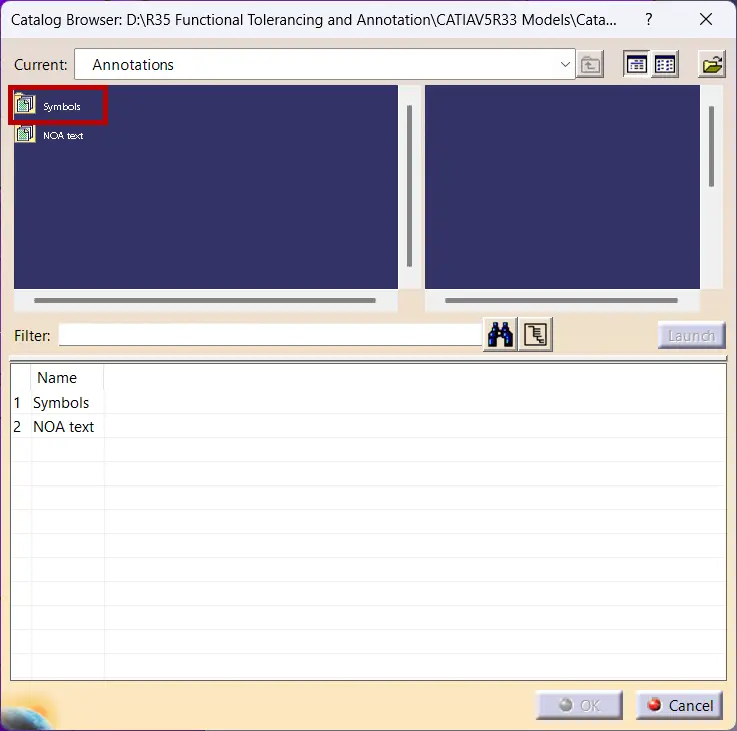
The Catalog Browser displays the catalog.

Viewing catalog and selecting symbol family for Note Object Attribute in CATIA V5 FT&A workbench

Double-click the Symbols family.

Step 8:

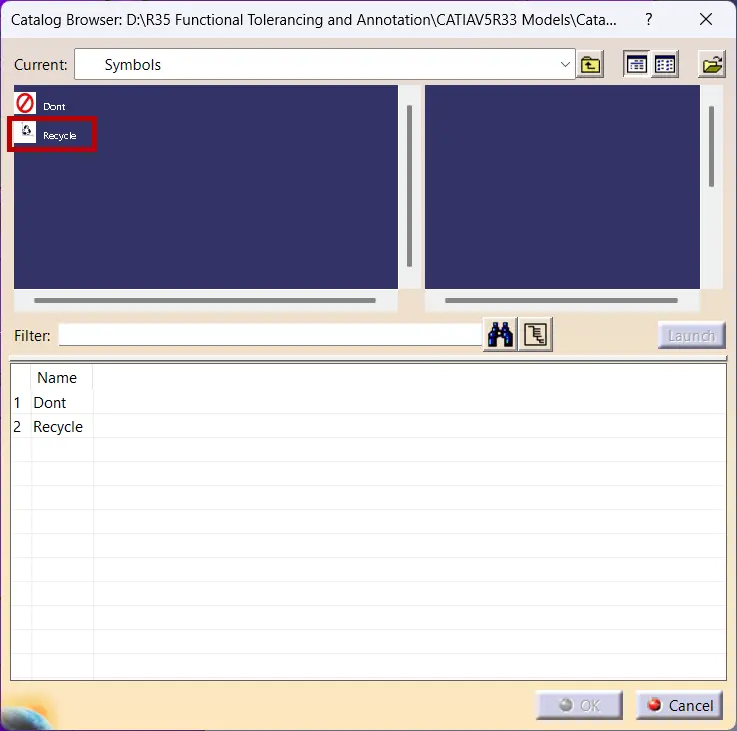
Click the Recycle 2D component.

Selecting recycle 2D component from catalog for Note Object Attribute in CATIA V5 FT&A workbench

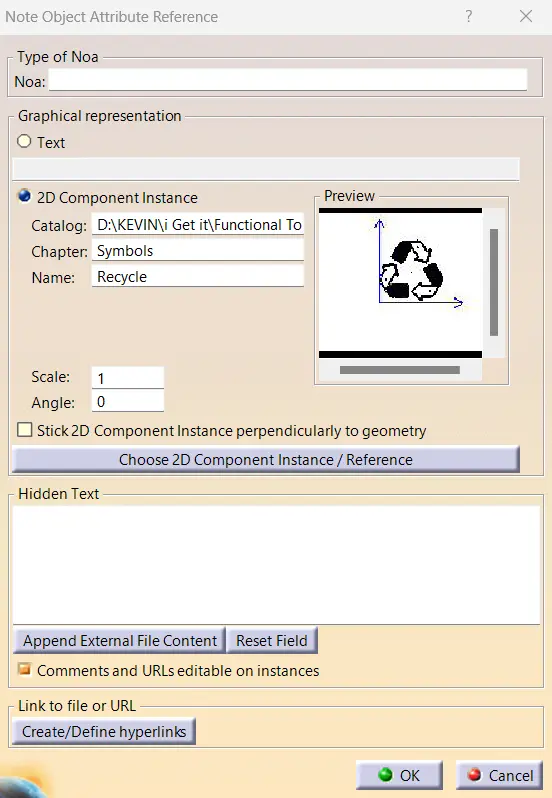
Click OK and the Preview area of the Note Object Attribute Reference dialog displays the Recycle 2D component.

Selecting recycle 2D component from catalog for Note Object Attribute in CATIA V5 FT&A workbench
Step 9:

Enter the following text in the Hidden Text area: Apply Recycle decal #2.

Step 10:

Click OK. Reposition the NOA as necessary.

Preview of recycle 2D component in Note Object Attribute dialog in CATIA V5 FT&A workbench

Why this matters

1. Reduces repetitive annotation work
Instead of creating the same annotation multiple times, NOA with Ditto allows reuse of predefined elements, saving time during modeling and detailing.

2. Maintains consistency across the design
Using catalog-based annotations ensures that symbols, text formats, and instructions remain uniform throughout the model.

3. Supports standardized engineering workflows
Reusable annotation elements help align with company standards, especially in manufacturing and documentation processes.

Conclusion

Using Note Object Attributes with Ditto in CATIA V5 provides a structured way to manage annotations beyond basic note creation. By combining text, graphical elements, and reusable components, it allows annotations to carry more meaning while staying consistent across the model.

This approach fits naturally into workflows where repeated instructions, symbols, or standards need to be maintained without manual effort. Over time, leveraging catalogs and reusable annotation elements can significantly improve clarity, efficiency, and overall design quality within the FT&A environment.


FAQs

What is CATIA V5 used for?

CATIA V5 is used for 3D product design, engineering, and modeling across industries such as automotive, aerospace, and manufacturing.

What is the FT&A workbench in CATIA V5?

FT&A (Functional Tolerancing & Annotation) workbench is used to define 3D annotations, tolerances, and manufacturing information directly on the model.

What is Note Object Attribute in CATIA V5?

Note Object Attribute (NOA) is an annotation feature that allows reusable notes with text, symbols, and associated properties within the FT&A workbench.

How are annotations reused in CATIA V5?

Annotations can be reused using features like NOA and tools such as Ditto, which allow duplication while maintaining properties and associativity.

What modules should be covered in CATIA V5 training?

A complete CATIA V5 learning path typically includes Sketcher, Part Design, Assembly Design, Drafting, Surfacing, and FT&A workbench for annotations.

Is FT&A important in CATIA V5 workflows?

Yes, FT&A plays a key role in adding manufacturing information directly to 3D models, improving clarity and reducing dependency on 2D drawings.

Where can I learn CATIA V5 with practical examples?

Structured training platforms such as i GET IT by Tata Technologies provide module-based learning with practical exercises and real-world workflows.

Which CATIA V5 topics are important for design engineers?

Key areas include Part Design, Assembly Design, Surfacing, Drafting, and FT&A for annotations and tolerancing.

Can CATIA V5 annotations include symbols and instructions?

Yes, using features like Note Object Attributes, annotations can include 2D symbols, graphical elements, and hidden instructions for manufacturing use.

Explore Comprehensive CATIA V5 Training by Tata Technologies

Learn CATIA V5 from sketching and modeling to assemblies, surfacing, and FT&A with practical, industry-relevant workflows.

Explore CATIA V5 TrainingContact Us
Form Submissionggg
Image description
Fill in your details and Submit to Connect

Submit details and we will get back to you!!!

SME
Image description
Join our Author, Campus & Reseller Program

Submit details and we will get back to you!!!

Styled Form
Image description

Show your Interest

Submit details and we will get back to you!!!

SME
Image description
Join our Author, Campus & Reseller Program

Submit details and we will get back to you!!!

Form Submission
Image description
Tell Us Where to Send the Syllabus?

Submit details and we will get back to you!!!

Form Submission

Prioritize GD&T before diving into any design software

Invest in your future to
transform your Career path

Become a GD&T Expert
LMS
logo

Autodesk Training Subscription

1010

OR

Verify email

Start your 3 days free trial now


Already have an account? Sign In

By clicking the button above, you accept our terms of use and privacy policy.

LMS
logo

Autodesk Training Subscription

1010

OR

Verify email

(Ensure popup is allowed for this site)

Start your 3 days free trial now

Already have an account? Sign In

By clicking the button above, you accept our terms of use and privacy policy.

LMS
logo

Sign In

Have Organization Sign In?  Use Single Sign On

Don't have an account? Sign Up

OR

logo

Sign Up

Already a user? Sign In

Verify

(Ensure popup is allowed for this site)

OR


Have Organization Sign In?   Use Single Sign On

By Registering you agree to the Terms of Use and Privacy Policy.

logo

Single Sign On

If your company has single sign-on set-up with i GET IT, enter your company's web address to access your unique login page. The format needs to be as such: "domainname.com".

(Ensure popup is allowed for this site)

Not an enterprise user?Sign In
logo

Forgot Password

Enter your email and we'll send you instructions on how to reset your password.

Styled Form
Image description

Avail Offer on Courses

Submit details and we will get back to you!!!