How to Close a Surface to Create a Solid | CATIA V5
March 14, 2023 2024-11-11 14:31How to Close a Surface to Create a Solid | CATIA V5
How to Close a Surface to Create a Solid | CATIA V5
Overview
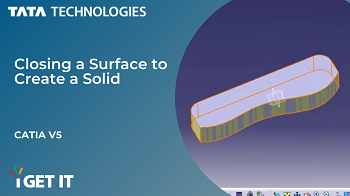
In this Tech Tip you will learn to close a surface and create a solid body.
It is located on the Surface-Based Features toolbar. Follow the steps and video to know more…
Step 1
Begin by making sure you are in the Part Design workbench.
Then select Insert > Surface-Based Features > Close Surface.
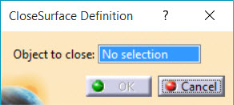
The Close Surface Definition dialog displays.
Step 2
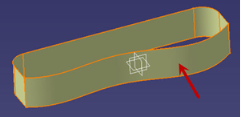
Next make sure the Object to close box is highlighted and in the Graphics Window, pick the surface as shown in the image.
Step 3
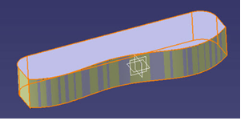
Complete the process by clicking OK to create the solid.
If you should have any questions, please reach out to iproducts@tatatechnologies.com or igetitsupport@tatatechnologies.com for help.
Manya
Manya thrives at the intersection of words and technology. She is a passionate writer and specializes in skill development and career exploration related content in mechanical engineering field.
Related Posts
Battery Management System (BMS) in EVs: Working & Functions
October 6, 2026
234 views
Sketch Checking in Siemens Designcenter: A Quick Tech Tip
September 30, 2026
187 views
Manufacturing Process Planning: Step-by-Step Guide for Engineers
September 10, 2026
231 views
How to Insert a Sketch Picture in SOLIDWORKS (Step-by-Step Guide)
July 15, 2026
412 views
CATIA V5 Tutorial – How to Use Note Object Attribute with Ditto
April 10, 2026
950 views
Find
Categories
Latest Posts
Battery Management System (BMS) in EVs: Working & Functions
October 6, 2026Sketch Checking in Siemens Designcenter: A Quick Tech Tip
September 30, 2026Manufacturing Process Planning: Step-by-Step Guide for Engineers
September 10, 2026Popular Tags
3DEXPERIENCE
ACES
Aerospace
Aircraft Cabin
Assembly
autodesk
Autodesk Inventor
Business
CAD
CAD courses
cad design
CAM
cam and follower
Career
cars
CATIA
CATIA tutorials
CATIA V5
catiav5
Chamfer
corner relief
CREO
design engineering
Design Engineers
dimensioning
Engineering Education
ev
EV Engineer
inventor
Mechanical Design
Mechanical engineering
NX
NX 2306
Online Certification
product design
PTC
Sketcher
Sketching
Solid Combine
solidworks
Spinal Bend
tech
tech tips
threaded stud work
Upskilling